
🚨 READ ME 🚨 - New AWS Sign-in & Sign-up Experience
AWS is rolling out a new sign-in and sign-up experience for some users.
PLEASE USE THE 'ADVANCED' EXPERIENCE FOR NOW.
I will be creating videos & updates to explain more about this soon. And I am monitoring AWS' rollout of these features & what it means for your learning & real-world usage.
You may see this new sign-in/sign-up experience:
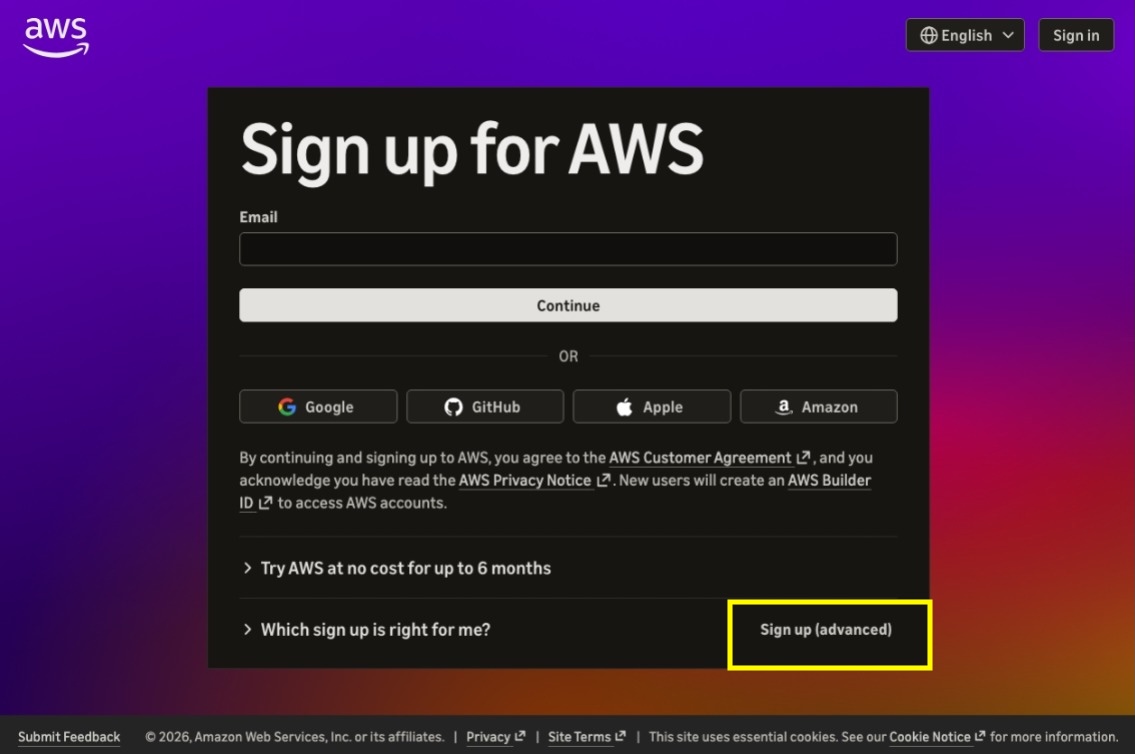
When creating your account(s) to use for this course, please use the 'Sign up (advanced)' option indicated with the yellow box above.
WHAT DOES THE NEW EXPERIENCE DO?
The new experience configures many AWS services & features for you, before you learn what they are and how to use them.
This can be helpful if you want to build fast. But it can make learning difficult.
The new experience:
- Creates an AWS Organization for you
- Creates one or more AWS accounts for you (renamed "projects")
- Signs you in with a personal AWS Builder ID
- Switches on identity features like Identity Center
- Locks down your accounts (using SCPs)
- Locks you into a single Region
WHY SHOULD YOU USE THE ADVANCED SIGN-IN/SIGN-UP
The new experience hides many key services and manages them for you, making it difficult for you to learn about them in your own demo environment.
My course has been structured to help you:
- Understand services/features the way you'll see in production
- Learn services/features and when to use them
- Build & experience things in demos like you will experience in the real-world
WHAT ABOUT IN THE REAL WORLD / WHERE I WORK?
AWS recommends using the advanced experience when you want:
- Complete control over your own AWS account
- Fine-grained control over your permissions
- Access to all AWS features and Regions
Many real-world environments you will work with have been built the way the advanced experience works (you create the accounts/org/identities yourself). So for now, that is why I recommend it for the course.
... FYI: I will continue to monitor this rollout and will make updates to this course as we learn more about the features AWS includes/excludes in the new experience.